


Every JEE Main aspirant eventually asks the same practical question: which city will I be writing my paper in, and when do I find out? The answer arrives in the form of the JEE Main intimation slip, a short advance notice from the National Testing Agency (NTA) that names your allotted exam city well before the admit card goes live.
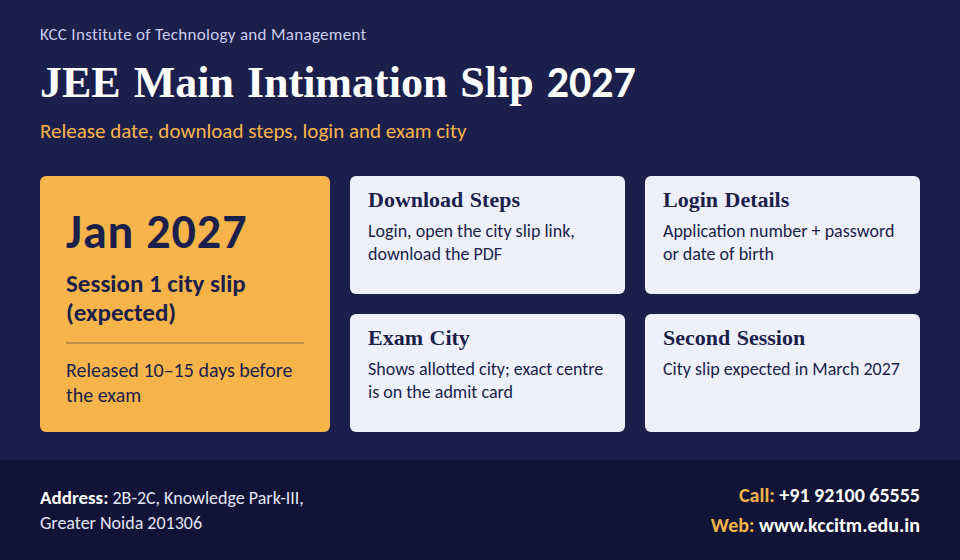
NTA has now published the JEE Main 2027 Session 1 notice, dated 24 October 2026. Online applications are open from 24 October to 22 November 2026, and the Session 1 exams are scheduled for 20, 21, 22, 23, 24 and 28 January 2027. The admit card is listed for 13 January 2027. NTA has not yet announced a separate date for the city intimation slip, but going by the usual gap of one to two weeks before the first paper, it is most likely to appear between the end of December 2026 and the first week of January 2027. Treat that window as an estimate until NTA confirms it.
This guide explains what the slip is, how the JEE Main intimation slip login works on jeemain.nta.nic.in, what the JEE Mains city intimation does and does not tell you, how it differs from the admit card, and what to do if the page refuses to cooperate. Bookmark it, because we refresh the slip date as soon as NTA announces it.
What Is the JEE Main Intimation Slip 2027?
The JEE Main intimation slip, also called the advance city intimation slip or exam city slip, is an online notice that NTA issues to registered candidates before each session. Its single job is to tell you which city has been assigned for your exam and, in most cases, the date your paper is scheduled.
Think of it as an early heads-up rather than an entry pass. It lets a student living in, say, a small town in Uttar Pradesh find out whether the exam city is next door or a night-train journey away, and plan accordingly. The exact exam centre, reporting time and shift are not part of it. Those details come later in the admit card.
A few quick facts worth remembering:
- Issued by: National Testing Agency (NTA)
- Mode: Online only, through the candidate login on the official JEE Main portal
- Who gets it: Every candidate whose application is accepted for that session
- Separate slips: Paper 1 (B.E./B.Tech), Paper 2A (B.Arch) and Paper 2B (B.Planning) candidates are each intimated for the paper they applied for
- Entry to the exam hall: Not valid. Only the admit card, along with a valid photo ID, gets you in
JEE Main Intimation Slip 2027: Expected Dates
NTA has not yet announced the release date of the 2027 intimation slip, but the Session 1 schedule is now official. The table below uses the dates from NTA’s notice of 24 October 2026. Anything marked expected is an estimate based on earlier years, not an announcement.
| Event | Session 1 | Session 2 |
|---|---|---|
| Online registration | 24 October to 22 November 2026 (late fee: 23 to 26 November) | 5 January to 3 February 2027 |
| JEE Main intimation slip release | Not announced; expected end of December 2026 to first week of January 2027 | Expected March 2027 |
| Admit card | 13 January 2027 | About 3 days before each exam date |
| Exam dates | 20, 21, 22, 23, 24 and 28 January 2027 | Expected April 2027 |
| Result | Expected February 2027 | Expected April to May 2027 |
The slip has usually arrived one to two weeks before the exam. With the first paper on 20 January and the admit card due on 13 January, candidates should start checking the portal from the last week of December rather than waiting for a message to land in their inbox.
If you have not applied yet, the last date for Session 1 is 22 November 2026 (up to 11:50 pm). A late-fee window runs from 23 to 26 November, and the correction window is 27 to 29 November. Only candidates with a completed application receive a slip.
Note: Session 1 dates are taken from NTA’s notice of 24 October 2026. This page will be refreshed once NTA announces the exact date of the city intimation slip.
How to Do the JEE Main Intimation Slip Download on jeemain.nta.nic.in
The only place to get your slip is the official portal, jeemain.nta.nic.in. Once NTA activates the link, the process takes under two minutes.
- Open a fresh browser tab and type jeemain.nta.nic.in directly into the address bar instead of clicking a link from social media.
- On the home page, look in the “Latest News” or candidate activity area for the link titled Advance City Intimation Slip or Exam City Slip for the current session.
- Click it to reach the candidate login screen.
- Enter your application number and password. If the page asks for your date of birth instead, use the one you entered in the application form, in the format shown on screen.
- Type the security PIN shown in the image, then press Submit.
- Your exam city and date appear on screen. Use the download or print option to save the PDF.
- Rename the file with your name and session, save a copy to your phone and email one to yourself.
A printed copy is handy for family members and for booking travel, though no one will ask to see it at the exam gate.
Download Checklist
- Application number from the confirmation email or the confirmation page PDF
- Password you created during registration
- Date of birth exactly as entered in the form
- A working internet connection and an updated Chrome or Firefox browser
JEE Main Intimation Slip Login: Credentials and Recovery
The JEE Main intimation slip login uses the same account you created while registering. No separate sign-up is needed. Here is what each credential is and where to find it.
| Credential | What it is | Where to find it |
|---|---|---|
| Application number | The unique ID generated when you submitted the form | Confirmation page PDF and the email or SMS from NTA |
| Password | The one you set during registration | Your own record; reset it from the login page if lost |
| Date of birth | Used as an alternative to the password on some login screens | Your application form and Class 10 certificate |
| Security PIN | A short code displayed as an image on the login page | Shown on screen at every login attempt |
Forgot Your Application Number or Password?
Both can be recovered without contacting NTA, as long as your registered mobile number or email is still active.
- Go to the login page on jeemain.nta.nic.in.
- Choose the option for a forgotten application number or forgotten password.
- Enter the registered email ID or mobile number and the other details the page asks for.
- Verify the one-time password (OTP) sent to you.
- Retrieve your application number or set a new password, then log in again.
If the OTP never arrives, check your spam folder and the signal on the number you registered. Still stuck? Skip ahead to the helpline details in the troubleshooting section below.
Tip for first-time users: Write your application number on the first page of your JEE notes. You will need it again for the admit card, the answer key challenge and the result.
What You Will See on the Slip, and What You Will Not
The layout can change slightly from one session to the next, but the core content stays the same.
| Usually shown | Not shown |
|---|---|
| Candidate name and application number | Full address of the exam centre |
| Paper applied for (Paper 1, 2A or 2B) | Reporting time and gate-closing time |
| Allotted exam city (and state) | Shift (morning or afternoon) |
| Exam date and session | Roll number |
| Other profile details such as gender, date of birth and exam medium, depending on the session’s format | Detailed exam-day instructions |
As soon as you open the PDF, compare your name, date of birth, category and paper against your application. A mismatch now is far easier to fix than one discovered on the morning of the exam.
Intimation Slip vs Admit Card: Do Not Mix Them Up
Every session, a few candidates walk up to the exam gate holding only the city slip. The two documents are released at different times and serve different purposes.
| Point of difference | City intimation slip | Admit card |
|---|---|---|
| Purpose | Advance notice for travel and stay planning | Official entry pass for the exam |
| Release timing | Roughly 1 to 2 weeks before the exam | Around 3 days before the exam |
| Exam centre address | No, only the city | Yes, complete address |
| Shift and reporting time | Not mentioned | Mentioned |
| Roll number | Not given | Given |
| Accepted at the exam gate | No | Yes, with a valid photo ID |
| Can the city change after release | Generally no | Not applicable |
JEE Mains City Intimation: How Your Exam City Is Decided
The JEE Mains city intimation is not random. It follows from choices you made while filling the application form and from how many seats each city can accommodate.
- Your preferences come first. JEE Main has traditionally let applicants name several cities as preferences, usually capped at four, and NTA tries to honour them in order.
- Capacity decides the rest. If the centres in your first choice are already full, you may be placed in your second or third choice, or in another city within your state.
- Home state matters. Candidates are normally allotted a city in the state of their permanent or correspondence address, subject to availability.
- Foreign centres. Candidates who opted for centres outside India are allotted from that list.
Can You Change the City After the Slip Is Out?
In general, no. NTA treats the city shown on the slip as final, and requests for changes are not entertained once it is issued. The one realistic exception is a genuine error on NTA’s side, such as the wrong state appearing against a correct address. In that case, contact the helpline with your application number and proof.
This is also why careful city selection at the application stage matters. Pick cities you can actually reach, and keep the travel time from your home or hostel in mind.
A Practical Way to Read Your Allotted City
- Same city or within 2 to 3 hours: Travel on the previous day or on the morning itself if the first shift is not too early.
- Different district or state: Reach the city at least one day early and book a stay close to the city centre or railway station.
- Far-off city: Book tickets the moment the slip is out, because seats on popular routes disappear quickly.
JEE Main Intimation Slip Not Opening or Downloading? Try This
High traffic right after release is the most common culprit. Work through the fixes in this order.
| Problem | What to try |
|---|---|
| Link not visible on the portal | The slip may not be released yet. Check NTA’s public notice and try again later in the day. |
| Login fails | Re-enter the application number without spaces, retype the password slowly and refresh the security PIN if it is unclear. |
| Page loads slowly or crashes | Switch to Chrome or Firefox, clear cache and cookies, or try early morning or late night. |
| PDF does not download | Disable pop-up blockers, try another device, or use the print option and save as PDF. |
| Wrong name, DOB or paper on the slip | Do not wait. Write to NTA with your application number and a scan of the supporting document. |
| Different exam city than expected | The city is usually final. Plan your travel instead of waiting for a change. |
NTA Helpdesk
- Phone: 011-40759000
- Email: jeemain@nta.ac.in
- Website: jeemain.nta.nic.in
Before calling or writing, keep your application number, registered mobile number and a screenshot of the error ready. It speeds up the response.
What to Do After You Download the Slip
The slip starts a short countdown. Use those one to two weeks well.
- Verify the details. Check every field against your application confirmation page.
- Lock in travel. Book tickets and a stay near your exam city right away, ideally within walking or short auto distance of the railway station or bus stand.
- Do a route recce if you can. Once the admit card shows the centre, check the route on a map app and note the travel time for the morning of the exam.
- Watch for the admit card. Log in again about three days before your exam date and download it as soon as it appears.
- Prepare your document folder. Keep the admit card printout, a valid photo ID, passport-size photographs if the instructions ask for them, and a transparent pen in one folder.
- Shift to revision mode. Take full-length mock tests at the same time of day as your shift, and avoid starting new topics in the last week.
If your exam city is in a different state, consider travelling with a parent or a friend who is also appearing, so that logistics do not eat into your focus.
Common Mistakes and Fake-Website Warning
- Treating the slip as the admit card. It will not get you into the exam hall.
- Waiting for the notification SMS. Messages can be delayed. Check the portal yourself.
- Ignoring errors. A wrong date of birth or paper code can cause trouble later in the process, including at counselling.
- Using unofficial links. Several lookalike sites collect application numbers and passwords. Type jeemain.nta.nic.in yourself, check for the NTA branding and never share your password or OTP with anyone.
- Paying for “fast” slips. NTA does not charge for the intimation slip or the admit card. Any website or agent asking for money to download them is not genuine.
- Booking non-refundable travel too early. Wait for the slip, then book. Before that, only your preferences are known, not your allotted city.
Frequently Asked Questions on JEE Main Intimation Slip 2027
1. What is the JEE Main intimation slip?
It is an advance online notice from NTA that tells you the city allotted for your JEE Main exam and your exam date, so you can plan travel before the admit card is released.
2. When will the JEE Main intimation slip 2027 be released?
NTA has not announced a separate date yet. With the Session 1 exam starting on 20 January 2027 and the admit card due on 13 January, the slip is likely to appear between the end of December 2026 and the first week of January 2027. Session 2 slips (April 2027 exam) are expected in March 2027.
3. How do I complete the JEE Main intimation slip download?
Go to jeemain.nta.nic.in, open the city intimation slip link, log in with your application number and password or date of birth, enter the security PIN, and save the PDF.
4. What is needed for the JEE Main intimation slip login?
Your application number, password (or date of birth where the page asks for it) and the security PIN shown on screen.
5. Is the intimation slip the same as the admit card?
No. The slip gives only the city and date. The admit card gives the centre address, shift, reporting time and roll number, and it is the document required at the gate.
6. Can I change my exam city after the slip is released?
Normally not. The allotted city is treated as final. Only a clear error from NTA’s side is likely to be looked at, through the helpdesk.
7. Why did I get a city I did not choose?
City allotment depends on your preferences and on centre capacity. If your preferred cities were full, NTA places you in another available city.
8. Do I get a separate slip for B.Arch and B.Planning?
Yes. Candidates are intimated according to the paper they applied for, so those who registered for more than one paper may see separate entries.
9. What should I do if there is a mistake in my slip?
Contact the NTA helpdesk immediately with your application number and supporting documents, and keep checking the portal for the correction instructions.
10. Which website should I use for JEE Main updates?
Use only the official portal, jeemain.nta.nic.in, along with NTA’s main website for public notices.
Conclusion
The JEE Main intimation slip 2027 is a small document with a big practical payoff: it turns an unknown exam city into a travel plan. With Session 1 starting on 20 January 2027, the safest approach is to finish your application before 22 November, start checking jeemain.nta.nic.in from the last week of December, keep your application number and password handy, and download the slip the day it goes live. Verify every detail, book your travel without delay, and then move your full attention back to revision. The admit card, with your exact centre and shift, will follow on or around 13 January.
Official portal: jeemain.nta.nic.in
Read More:
JEE Main Maths Syllabus 2027: Unit-Wise Topics, Weightage, Study Plan & Best Books
JEE Main 2027 Registration (Live): Session 1 Form Dates, Last Date, Fees, Documents and Direct Link
JEE Main 2027 Exam Fees: Category-Wise Registration Fee for General, OBC, EWS, SC/ST
JEE Main Admit Card 2027: Check Dates, How to Download?
JEE Main 2027 Registration Documents Required: Complete Checklist, OBC Documents, File Sizes & Fees
JEE Main Application Form 2027: Registration Process, Login, Fees and Documents